In the summer of 2008, the Obama campaign asked supporters to text "VP" to 62262 to be the first to learn his running mate.
Nearly 3 million people got that text about Biden – it was the largest SMS event in U.S. political history at the time. For a lot of organizers, it was the moment that proved texting could be a real channel.
That was almost 18 years ago, and the basic model of keyword-based texting hasn't really changed much: get a number, advertise a keyword, send back a canned response. Maybe a simple branching menu. It works well enough for basic scripted responses, but it's quite limited.
Daisychain now supports keywords, and we've built them to do a lot more than auto-reply.
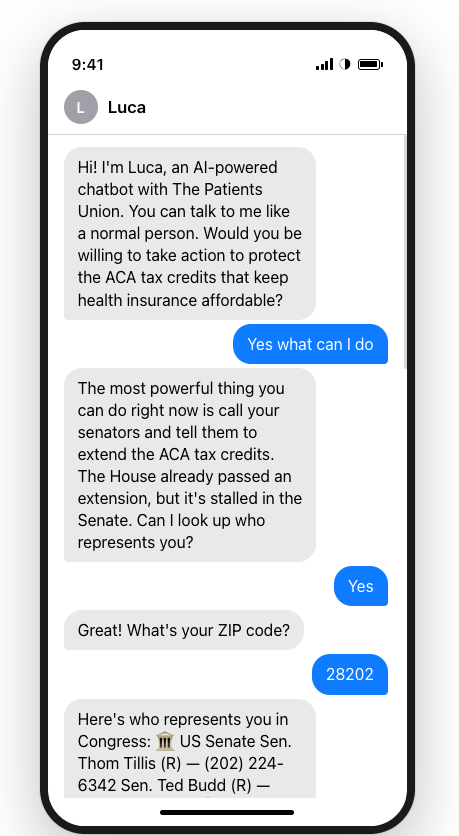
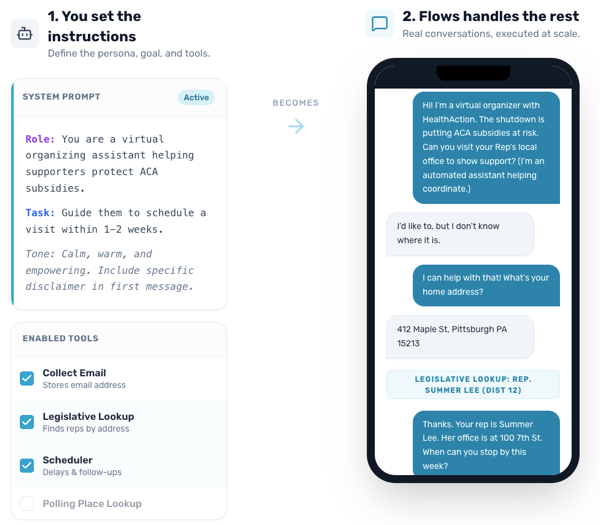
When someone texts a keyword to your number, it can kick off a full Flow: a multi-step, personalized conversation powered by smart branching and responsible AI. This isn't just a static, templated response, it's an automated conversational experience that can record data, follow up with people, look up information, and more.
Here's what that looks like in practice:

Here’s a few examples of how you might use keywords and Flows:
Local Organizing
A supporter texts LOCAL and a Flow asks for their zip code, matches them to their nearest chapter or organizing team, and introduces them to a local leader – with the option to hand off the conversation to a real organizer on the other end.
Volunteer Recruitment
Put your number and a keyword like VOLUNTEER on a sign at your rally or canvass launch. When someone texts in, a Flow guides them through a short intake: what issues they care about, when they're available, and how they want to help. Their info gets saved and tagged automatically.
Get Out the Vote
A supporter texts VOTE and gets walked through a conversation: are they registered? Do they know their polling place? Want a reminder the day before the election? The Flow handles the lookup and schedules follow-ups.
Advocacy
Text ACTION to look up your legislators, learn about a bill, and get coached through calling your representative – all in one conversation thread.
Event sign-ups
Text JOIN at a town hall or community meeting to get details, RSVP, and receive a reminder the morning of.
If you've used keywords on other platforms, this will feel familiar to set up. The difference is what happens next: instead of a single reply, you have the option to start real conversations that collect data, answer questions, and move people to action.
Keywords are live now and available for every Daisychain account. If you're already using Flows, you can connect any Flow to a keyword from Settings > Channels > Texting > Keywords.
If you haven't tried Flows yet, we'd love to help you get started – feel free to reach out at hello@daisychain.app, or book a demo.